
Turn any quiz into a print-ready exam paper
Pick a school, mock-exam or JLPT/TOEIC-style format and download the student paper, answer key and answer sheet as PDFs.
- Start free
- No credit card required
- First quiz in 30 seconds
Are you a student?
Pick any topic and start practicing with AI-generated quizzes. Your progress and weak spots are recorded as you go.
Laying Out a Test by Hand Takes an Evening
Copying questions into a word processor, numbering sections, adding points, lining up options and then building a separate answer key is slow, and one edit means doing the layout again.
One Quiz, Three Print-Ready PDFs
Quizzz lays out the questions you already have, whether you wrote them or AI drafted them from your materials, in the exam format you choose. Questions are grouped into numbered parts by type, each question carries its points, and the student paper, teacher answer key and answer sheet come from the same source, so they always match.
Need a practice sheet instead of a test? Use the printable worksheet maker.
Built for Real Exam Papers
Formats Teachers Already Use
Taiwan school midterm and CAP mock-exam layouts, a JLPT-style Japanese paper, a TOEIC-style English paper, and standard and compact papers for any subject.
Student Paper, Answer Key and Answer Sheet
Every paper comes with a teacher answer key that shows the answer and explanation for each question, plus an answer sheet (a bubble answer card on the CAP mock format).
Header, Parts and Points
A header with fields such as school, exam, scope, class, seat number, name and score; numbered parts by question type; points per question and per part.
Local Labels in 8 Languages
The standard and compact papers print their wording in English, Traditional or Simplified Chinese, Japanese, Korean, Vietnamese, Indonesian or Thai, with local option labels such as (A), 1–4, ①–④ or ก–ง.
A Format Suggested for You
The format list puts the papers that fit your region and the quiz language first, with a preview page of each.
Paper and Online From One Quiz
The same quiz can also go out as an online exam through a Magic Link, with no student accounts, when part of the class sits it on screen.
How It Works
Start From a Quiz
Write your questions, or paste lesson material and let AI draft them. Review and edit every question.
Choose a Format and Points
Pick an exam format, check the header fields and set points for each part.
Download the PDFs
Download the student paper, the teacher answer key and the answer sheet, ready to print on A4.
See the Printed Pages
Real pages rendered from one sample quiz in four formats.
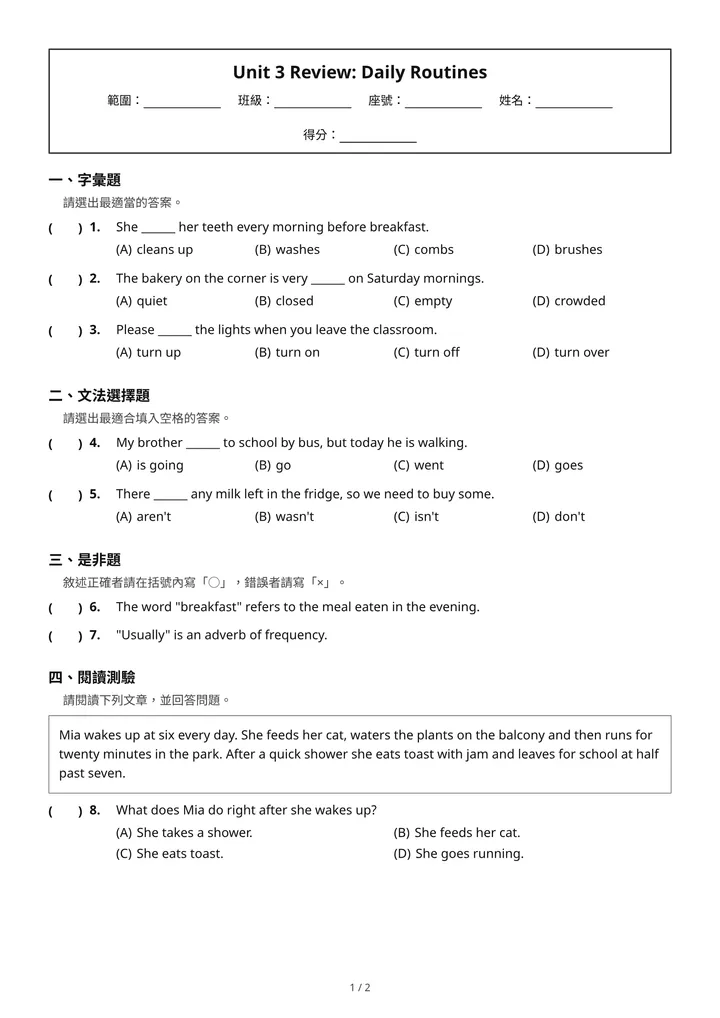
Taiwan school midtermStudent paper: boxed header, numbered parts, answer brackets 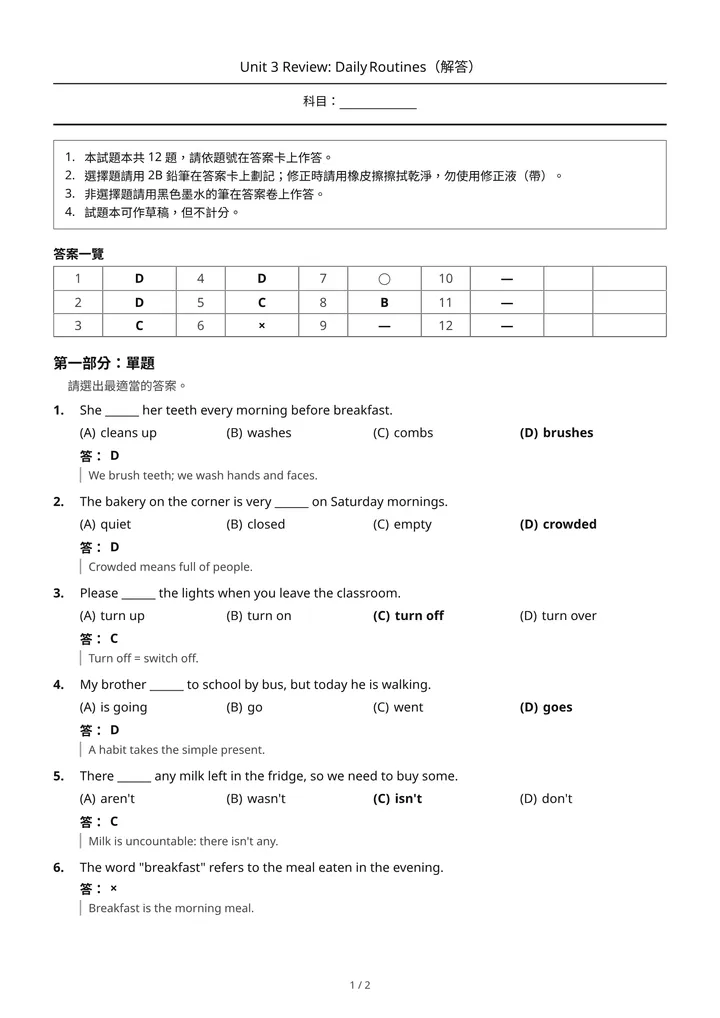
Taiwan CAP mock examTeacher answer key: answer and explanation for each question 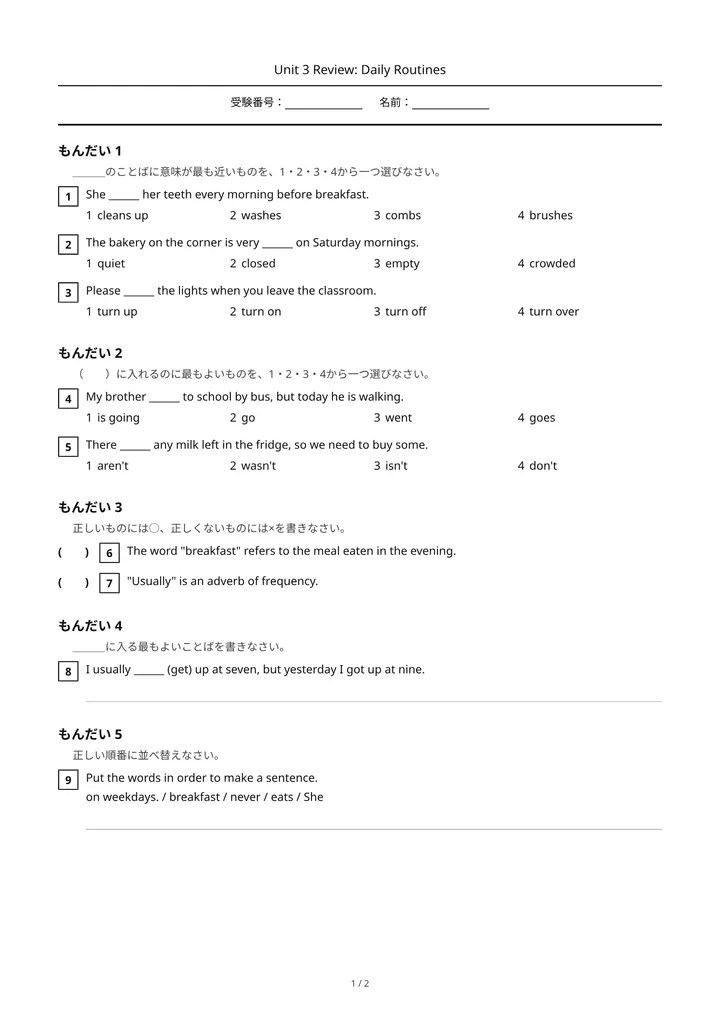
JLPT-style Japanese paperStudent paper: 1–4 options and JLPT-style instructions 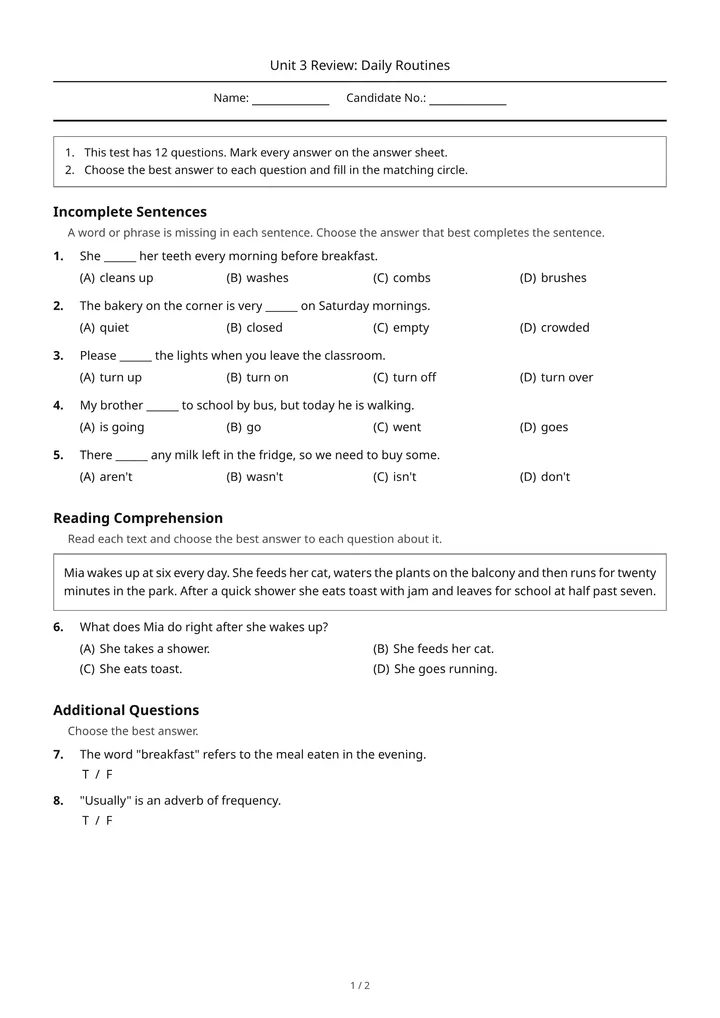
TOEIC-style English paperStudent paper: English part titles and candidate fields
Sample quiz with fictional content. Header fields are left blank for you to fill in.
Who Uses the Exam Paper Maker
School Teachers
Lay out midterms, finals and unit tests in the format your school prints, with a matching answer key for grading.
Cram Schools and Language Schools
Give students mock-exam practice on paper in a familiar layout, with an answer card they fill in like the real test.
JLPT and TOEIC Instructors
Print practice papers in a JLPT-style or TOEIC-style layout for classroom mock tests.
Teachers Working With Claude or ChatGPT
Connect Quizzz to Claude or ChatGPT and ask it to turn a quiz into an exam paper and render the PDFs from the chat.
Self-Study Learners
Studying for JLPT, TOCFL, or any language exam on your own? Pick a topic, let AI generate practice questions, and drill at your own pace. Track your weak areas over time — no teacher required.
Quizzz vs. Laying Out a Test in a Word Processor
| Feature | Word processor | Quizzz |
|---|---|---|
| Layout | Set up by hand for every test | Chosen exam format applied automatically |
| Parts and numbering | Renumbered by hand after every edit | Grouped by question type and numbered for you |
| Answer key | A second document kept in sync by hand | Generated from the same questions, with explanations |
| Answer sheet | Made separately | Included, as an answer card on the CAP mock format |
| Online version | Not available | Same quiz shared by Magic Link |
Quizzz keeps the questions in one place and lays them out as a paper, an answer key and an answer sheet that always agree.
Frequently Asked Questions
Which exam formats are available?+
Do I get an answer key?+
Can I edit the questions before printing?+
Can the paper be printed in Thai, Korean or Vietnamese?+
Can I make exam papers from Claude or ChatGPT?+
I'm a student — can I use this for self-study?+
More Vocabulary Worksheets & Word Puzzles
Cloze Test Generator
AI cloze test and fill-in-the-blank generator from reading passages with smart distractors and furigana/pinyin
Crossword Puzzle Maker for Language Teachers
Vocabulary crossword puzzle maker for language teachers — AI generates crossword clues and answers from lesson vocabulary in seconds, Magic Link sharing without student accounts, language-learner-appropriate clue writing, JLPT/TOCFL/CEFR alignment, Japanese/Chinese/English/Korean crosswords, printable PDF with answer key
Fill in the Blank Quiz Maker
Fill in the blank quiz maker for language teachers — AI generates cloze/fill-in-the-blank questions from lesson text, Magic Link sharing without student accounts, JLPT/TOCFL/CEFR vocabulary alignment, supports 17+ languages including Japanese furigana and Chinese pinyin
Printable Worksheet Maker
AI printable PDF worksheet and answer key maker from lesson materials with dual online and paper delivery
Sentence Unscramble Maker
Sentence unscramble maker for language teachers — jumbled-sentence ordering questions with one word per tile (whole-word tiles for Japanese and Chinese), drag or tap to reorder, up to five accepted word orders, automatic grading, Magic Link sharing without student accounts
Spelling Quiz Maker
Spelling quiz maker for language teachers — AI generates spelling tests from vocabulary lists and lesson content, Magic Link sharing without student accounts, supports 17+ languages including Japanese kana, Chinese characters, Arabic script, and Latin alphabet
Scrambled Words Quiz Maker
Scrambled-words quiz maker for language teachers — ordering questions where students put shuffled words back into a sentence or sequence, word tiles or a numbered list, up to five accepted orders, automatic grading, Magic Link sharing without student accounts (no letter-scramble mode; word search and crossword cover letter practice)
Word Search Preview
AI-assisted Chinese word-search authoring plus a playable student preview with English, Japanese, Korean, and Traditional Chinese vocabulary, language-native word banks, and grid instructions
Available in other languages
Explore More Features
Quiz Makers
Explore AI quiz makers by question type — audio, crossword, dictation, fill-in-the-blank, listening, matching, multiple-choice, and video quizzes
AI Quiz Maker
Generate quizzes from any material in seconds
MCP Quiz Maker
MCP quiz maker for Claude, ChatGPT Apps, and AI agents — create Quizzz quizzes, assignments, and Magic Links from a conversation
AI Study Tool for Students
AI quizzes, flashcards, guided practice, and weak-spot review for language self-study
Magic Link Assignment
Distribute quizzes with zero sign-up friction
Live Learning Insights
Real-time dashboard to track student performance
Furigana & Pinyin
Automatic furigana and pinyin annotation
Live Classroom Mode
Run interactive live quizzes during class
Vocabulary Quiz Maker
Free vocabulary quiz maker and vocabulary test generator for 40+ languages — JLPT, HSK, CEFR, and more
Stop Laying Out Tests by Hand — Print Your Next Exam From a Quiz
Choose a format, set the points and download the student paper, answer key and answer sheet.
Start Free- Start free
- No credit card required
- First quiz in 30 seconds
Free plan — unlimited quizzes, classrooms, students & share links
Are you a student? Start a quiz